Blog · Published August 27, 2026 · Updated August 27, 2026 · 16 min read
Coding Agent Memory: How It Works, and Where projectmem Fits
Coding agent memory is a persistent record of what happened while building a project — the bugs hit, the approaches tried, the fixes that worked, the decisions made — stored so an AI coding agent can read it at the start of a new session instead of starting from zero.
The need is structural, not a model failing. Claude Code, Cursor, Codex and the rest are stateless between sessions: each one re-reads your files, re-derives decisions you already made, and — the expensive part — can retry a debugging approach that already failed last week, because nothing recorded that it failed.
Several open-source projects address this, and they are not the same shape. mem0 (64.2k stars) is a universal memory layer for agents generally. cognee (30.3k) builds a graph-and-vector memory platform. agentmemory (27.6k) is a memory engine aimed squarely at coding agents. Letta (24.5k) is a whole stateful-agent framework. basic-memory (3.8k) keeps memory as markdown notes.
projectmem (766 stars, MIT) is the smallest of them by a wide margin, and it is on this page because it does one thing the others do not: it stores typed events — issue, attempt, fix, decision, note — rather than free-form recollections, and uses that structure to run a deterministic pre-commit gate that warns you before you repeat an approach that already failed.
Disclosure before anything else: projectmem and OSSDrop are both projects of Matily, run by the same person. That is why every figure in the table below was read from the vendor's own repository on 27 August 2026, why the star counts are shown even though ours is the smallest by two orders of magnitude, and why there is a section near the end about where projectmem is the wrong choice.
| Project | Stars | Licence | Language | What it is, per its own description |
|---|---|---|---|---|
| mem0 | 64,210 | Apache-2.0 | Python | "Universal memory layer for AI Agents" |
| cognee | 30,299 | Apache-2.0 | Python | Open-source AI memory platform giving agents persistent long-term memory |
| agentmemory | 27,628 | Apache-2.0 | TypeScript | "Persistent memory for AI coding agents based on real-world benchmarks" |
| Letta (MemGPT) | 24,470 | Apache-2.0 | — | "Platform for stateful agents: AI with advanced memory that can learn and self-improve" |
| basic-memory | 3,783 | AGPL-3.0 | Python | "AI conversations that actually remember" — markdown-based memory |
| mcp-memory-service | 1,909 | Apache-2.0 | Python | Persistent memory for agent pipelines (LangGraph, CrewAI, AutoGen) and Claude |
| projectmem |
| # | Tool | Best for | License | Stars |
|---|---|---|---|---|
| 1 | projectmem | recording why decisions were made and stopping an agent repeating a failed fix | MIT | 861 |
How we picked
Disclosure: projectmem and OSSDrop are both Matily projects, built by the same person. This is a review of our own tool sitting in a field where we are, by star count, the smallest participant. Four commitments follow.
Numbers come from source. Every star count, licence and language above was read from the project's GitHub repository on 27 August 2026. Descriptions are each project's own words. Where we describe projectmem's internals we are describing our own code, which you can read.
We do not claim a benchmark win, because there isn't one. projectmem's paper reports a two-month self-study across 10 projects and 207 logged events — that is dogfooding by the authors on their own work, not an independent evaluation, and it should be weighted accordingly. Anyone telling you which agent-memory tool is empirically best across real projects is ahead of the evidence, us included.
Token figures are projectmem's own measurements, taken from its documentation, not independently reproduced by a third party. They are reported below as the project's claims, labelled as such.
We say where the bigger tools are the better answer. mem0, cognee and Letta are not inferior products that we are positioning against; they are solving broader problems, with far more users and far more testing. The routing section is honest about which is which.

projectmem
Best for recording why decisions were made and stopping an agent repeating a failed fix
MIT · 861 stars · AI & Coding Agents
projectmem takes a narrower view of memory than most tools in this space. Instead of storing conversations or embedding documents for retrieval, it records typed events: an issue you hit, an attempt you made and whether it worked, a fix that resolved it, a decision you took, a note worth keeping. Those five types are the whole vocabulary, and the constraint is the point — structure is what lets software reason about the record rather than merely search it.
Everything lives in a plain .projectmem/ directory inside the repository. The raw log is an append-only events.jsonl; the distilled files (summary.md, PROJECT_MAP.md, issue files) are generated from it. There is no database and no persistent server. The MCP server is a stdio subprocess your editor spawns and kills with the session, exposing 15 tools to Claude Code, Claude Desktop, Cursor, Antigravity and Codex. The only thing that ever listens on a port is the optional dashboard you start yourself and stop with Ctrl+C.
That architecture has a consequence worth spelling out, because it is the practical difference from cloud memory services: memory travels with the repository. Clone the repo and you have the team's history — including the failed approaches — without provisioning anything. Add .projectmem/ to .gitignore and nothing leaves your machine at all. There is no account, no telemetry and no network call in the core tool.
The part that has no equivalent in the other tools is what happens at commit time, covered in its own section below. Everything else here — event capture, distilled summaries, MCP access — exists in some form elsewhere. The pre-commit gate does not.
The bottom line
The useful takeaway is that "agent memory" names three different problems — retrieval, conversation persistence, and experience memory — and most disappointment comes from buying one and expecting another. Work out which you need before comparing tools, and the field sorts itself out quickly.
projectmem is our own project and the smallest one on this page by a long way. What it offers is narrow and specific: a typed record of what was tried, living in the repository, with a deterministic check that fires before you repeat a failure. If you want semantic search over your codebase, or the largest and most-tested option, the table above points elsewhere and means it.
See the listing on OSSDrop, read the paper, browse more AI & Coding Agents tools, or drop your own open-source tool. If a figure here has drifted since 27 August 2026, tell us — accuracy is the only reason a comparison page is worth reading.
What coding agent memory actually is
The term covers at least three different things, which is why comparisons in this space so often talk past each other.
1. Context retrieval. Making a large corpus — your codebase, your docs — searchable so the agent can pull relevant chunks on demand. This is what vector stores and knowledge graphs do, and it is what most "AI memory" products mean. cognee and mem0 are strongest here.
2. Conversation persistence. Remembering what you and the agent said, so you do not re-explain your preferences every session. basic-memory and much of mem0's consumer framing address this.
3. Experience memory. Recording what was attempted and what happened — that this fix failed, that this decision was taken for that reason. This is the smallest category and the least served, because it needs structure that free-form notes do not have.
projectmem is squarely in the third. It will not find a function for you or semantically search your repo; that is not what it stores. What it holds is the thing your version-control history cannot tell you: git records what changed, not what was tried and abandoned. The failed branch you deleted, the approach you reverted, the reason you chose sessions over JWTs — none of that survives in the code, and all of it is exactly what an agent needs in order not to suggest it again.
If you are shopping in this space, work out which of the three you actually need first. Most frustration with agent memory tools comes from buying one category and expecting another.
The pre-commit gate, which is the actual differentiator
Every tool here can store that something failed. projectmem is the only one that acts on it at a moment when acting still matters.
When you commit, a deterministic check runs against the files in the commit. Not a model call — a lookup. If a file you are touching has failed attempts recorded against it, or carries a decision that predates several commits and may no longer hold, it says so before the commit lands:

Why a deterministic gate rather than an LLM check
This is worth dwelling on, because it is the design decision the whole tool rests on.
The check is a lookup against typed events, not a model asking itself whether this looks like a repeat. That means it is fast, free, offline, and identical every time you run it. It cannot hallucinate a warning, and it cannot be talked out of one. An LLM-based reviewer would be more flexible and less trustworthy — and since the whole point is to be believed at the moment you are about to repeat a mistake, trustworthiness is the property that matters.
It also means the value is bounded by your logging discipline. The gate can only warn about attempts that were recorded. This is the honest limitation of the design: projectmem raises the value of a habit you have to keep. In MCP mode the agent logs its own work, which removes most of the friction — but if neither you nor your agent records the attempt, the gate has nothing to say about it.
The complementary rule is that memory is never silently deleted. Tools that decay or prune old memories optimise for a tidy store; projectmem flags a memory as possibly stale and asks you to confirm or supersede it, keeping the superseded version. For a record whose job is to explain past reasoning, losing history to make room is the wrong trade — you cannot audit a decision whose predecessor was pruned.
What the memory looks like when you can see it
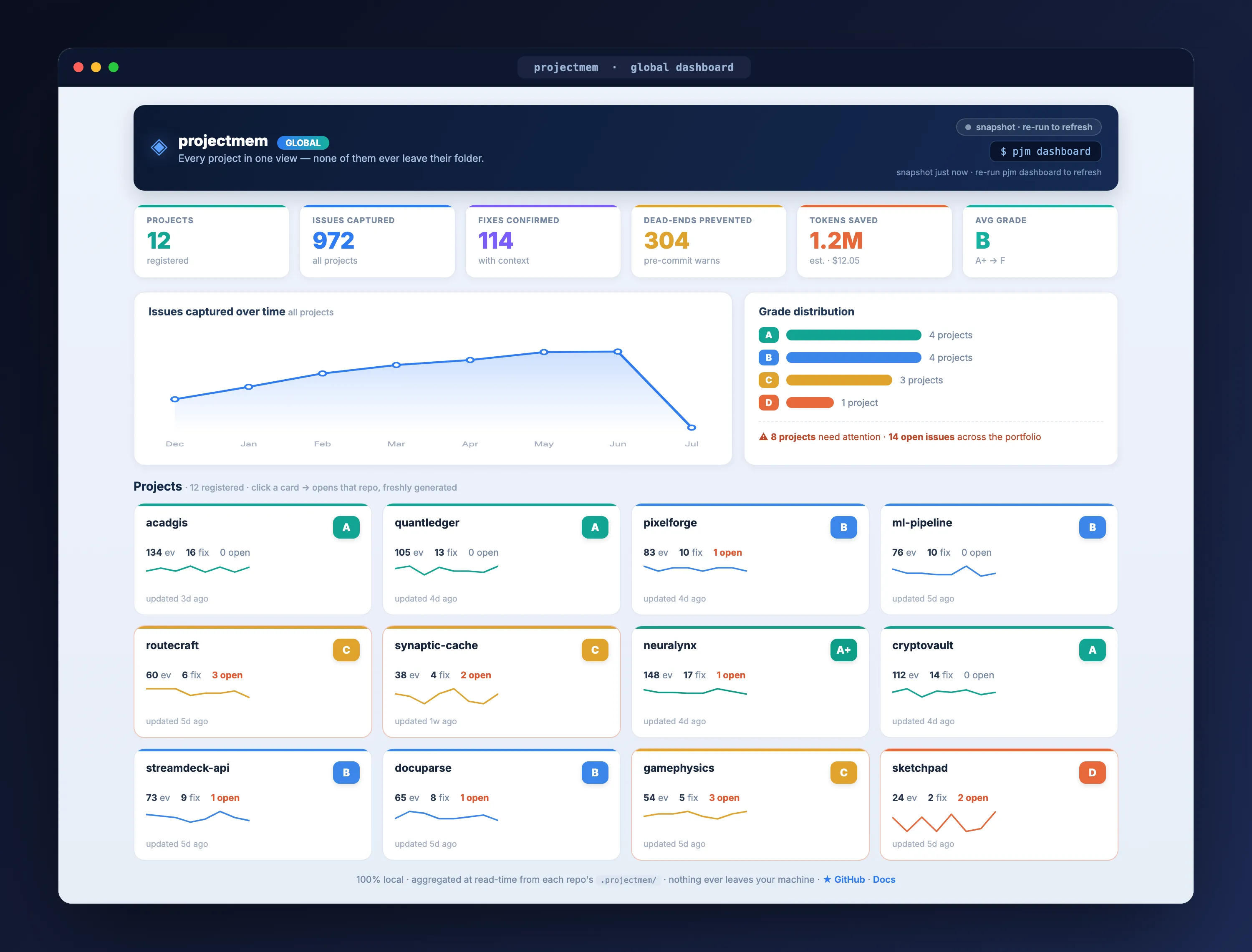
An append-only log of typed events turns out to be something you can render, and projectmem ships a local dashboard that does. This matters more than it sounds: the most common failure of any memory system is that nobody can tell whether it is working. Being able to look at what has accumulated is how you find out.
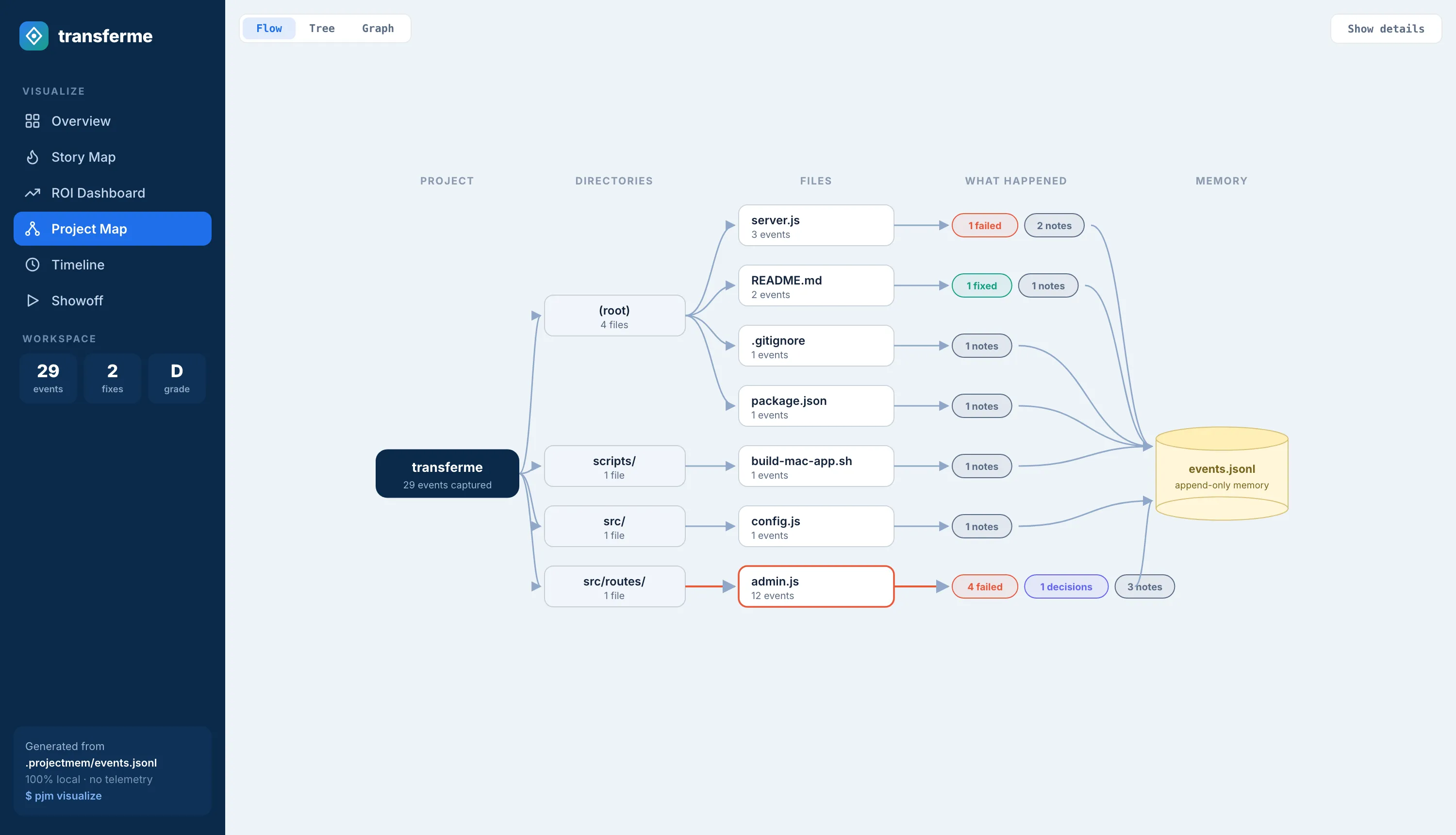
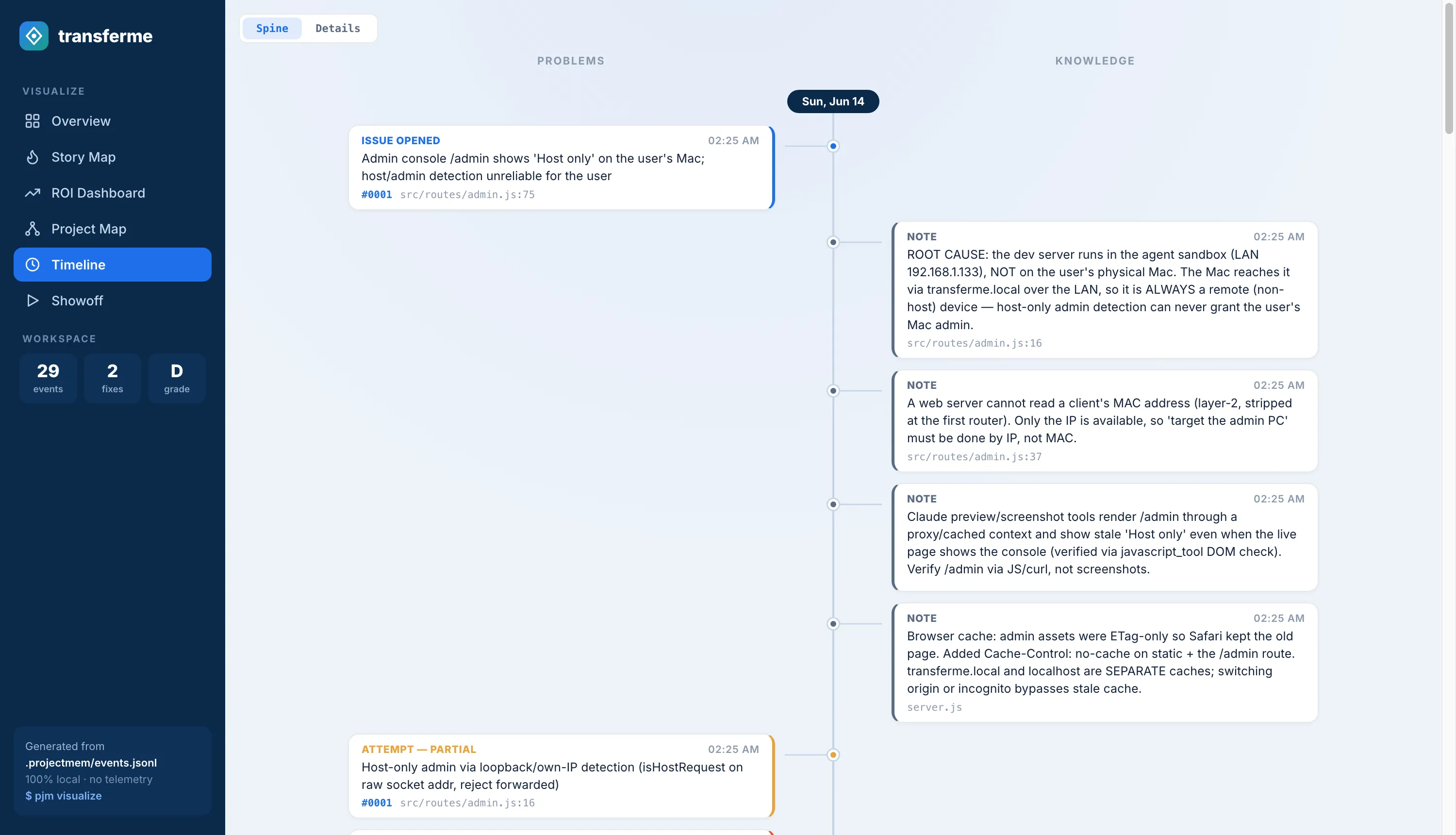
The Timeline puts real time down the middle, with problems branching left (issues, failed attempts) and knowledge branching right (fixes, decisions, notes). Hovering a card lights up its whole issue thread, so you can follow one bug from first symptom to eventual fix across weeks.
The part that is unapologetically for showing off
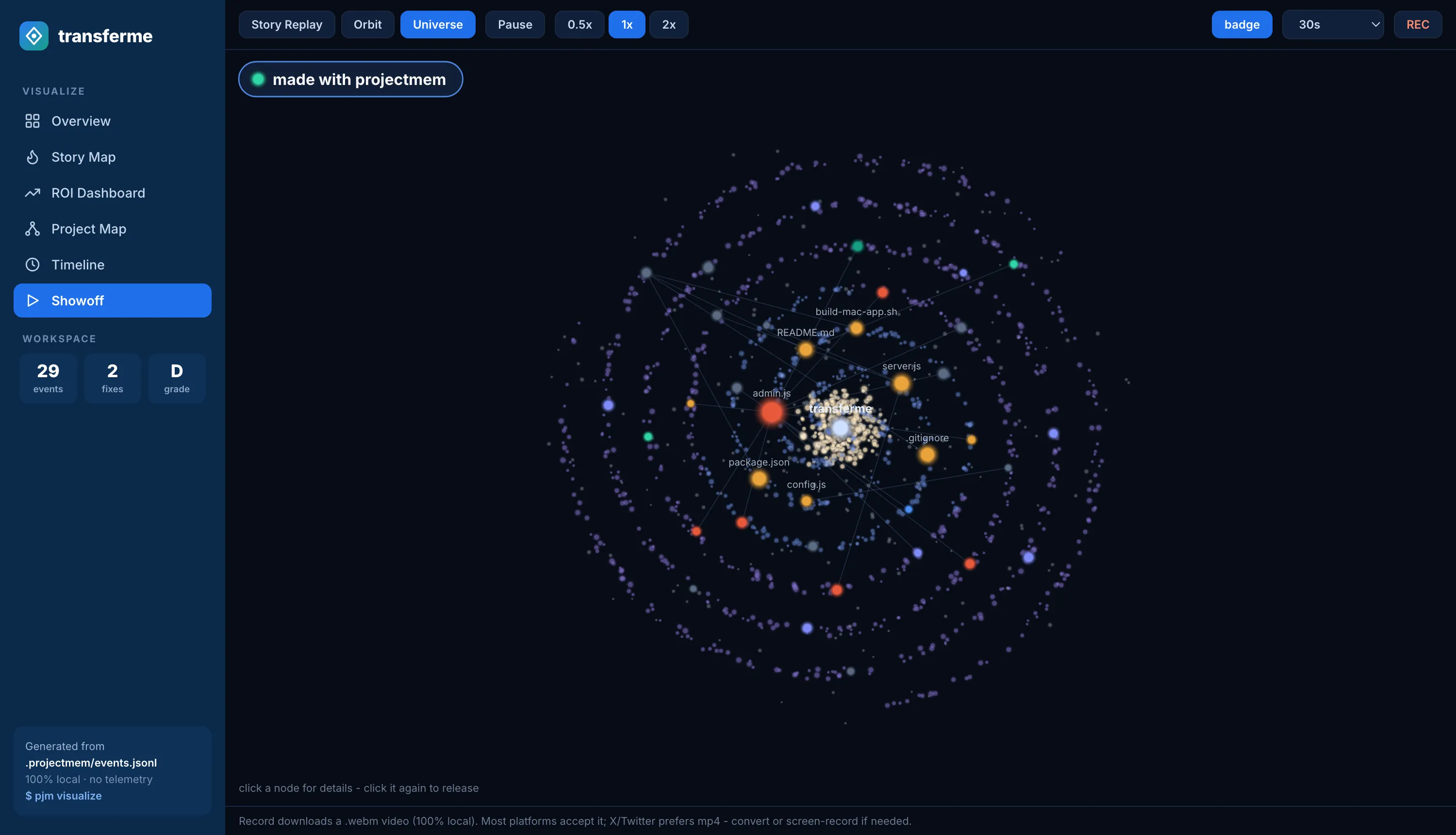
The dashboard also has a Showoff tab, which renders your real event log as animated scenes: Story Replay builds your project's history node by node, Orbit puts files in orbit around the project with their events orbiting them, and Universe renders the project as a rotating galaxy where every bright star is an actual issue, attempt, fix or decision — click one and you get its full record. A built-in recorder exports a 10–60 second .webm locally.
This is decorative and the documentation does not pretend otherwise. It is included here for two honest reasons. First, it is rendered entirely from the same real event log — nothing is simulated, so it doubles as a sanity check that the memory contains what you think it does. Second, a memory tool has an adoption problem before it has a technical one: the value only appears weeks later, when a warning fires. Something you can look at in week one helps a team stay with it long enough to reach that point.
If that argument does not move you, ignore the tab. Nothing else depends on it.
What it costs in tokens
The economic argument for agent memory is that reading a distilled summary is cheaper than re-deriving context from source files every session. projectmem's documentation puts numbers on it:
| Access mode | Tokens per session | How it works |
|---|---|---|
| No memory tool (baseline) | 5,000 – 20,000+ | Agent re-reads source files every session |
| Universal mode (markdown) | ~2,500 | Agent reads three small distilled files once |
| MCP mode (recommended) | ~800 – 1,500 | Agent calls get_summary(), then get_issue(id) only when relevant |
| pjm wrap (pre-injection) | 500 – 2,000 | Pre-generated context, you set the budget |
Source: projectmem documentation, read 27 August 2026. Treat as the project's own figures — your numbers will depend on repository size, agent, and how much history has accumulated. The architectural claim underneath them is checkable regardless: the agent never reads events.jsonl directly, only the small files that tools generate from it.
Which tool you should actually use
Honest routing, including away from ours.
- You need semantic search over a large codebase or document set — cognee or mem0. This is retrieval, and they are built for it with vastly more users. projectmem does not do this and is not trying to.
- You are building stateful agents as a product — Letta. It is a framework for agents that learn over time, not a memory file for a repo.
- You want memory across every conversation, not per project — mem0 or basic-memory. Note basic-memory's AGPL-3.0 licence if you plan to embed it commercially.
- You want the largest community and most third-party testing — mem0, by a wide margin. 64k stars buys a lot of edge cases already found by other people.
- You want a record of what was tried and failed, living in the repo, with a check that fires before you repeat it — that specific case is what projectmem exists for.
These are not mutually exclusive. Retrieval memory and experience memory answer different questions, and running a retrieval tool alongside projectmem is a reasonable setup rather than a contradiction.
Where projectmem falls short
In the order likely to matter to you.
It is small. 766 stars against mem0's 64,210 and cognee's 30,299. That gap is not a detail — it is thousands of users who have not hit your edge case yet, integrations that do not exist, and far fewer people to ask when something breaks. If you need the safest choice by adoption, it is not this one.
The evaluation is a self-study. The arXiv paper reports a two-month study across 10 projects and 207 logged events, conducted by the authors on their own work. That is a legitimate design report and honestly labelled, but it is not independent evidence, and no one should treat it as a benchmark result.
It depends on logging discipline. Events that are never recorded cannot warn you later. MCP mode has the agent log its own work, which helps a great deal, but the tool's value is downstream of a habit.
It is not a retrieval engine. No semantic search, no embeddings over your code. If what you wanted was "find me the function that does X", this is the wrong category of tool entirely.
The gate is git-only. Warnings fire on commit. A workflow that does not commit through git gets nothing from the feature that most distinguishes it.
Setup is developer-grade. pip install, a CLI, and per-client MCP configuration. Compared with signing up for a hosted service, that is real friction, and it will lose users who would otherwise benefit.
Frequently asked questions
What is coding agent memory?
Coding agent memory is a persistent record of what happened while building a project — issues hit, approaches attempted, fixes that worked, and decisions made — stored so an AI coding agent can read it at the start of a new session instead of re-deriving everything. Without it, tools like Claude Code and Cursor begin each session with no knowledge of previous ones.
Why do AI coding agents need a memory system at all?
Because they are stateless between sessions. Each new session re-reads project files and re-derives prior decisions, which costs tokens and time, and it can retry a debugging approach that already failed — because nothing recorded that it failed. Git records what changed, not what was tried and abandoned.
What are the open-source coding agent memory tools?
The main ones by GitHub stars as of 27 August 2026 are mem0 (64.2k, Apache-2.0), cognee (30.3k, Apache-2.0), agentmemory (27.6k, Apache-2.0), Letta/MemGPT (24.5k, Apache-2.0), basic-memory (3.8k, AGPL-3.0), mcp-memory-service (1.9k, Apache-2.0) and projectmem (766, MIT). They solve different problems: retrieval, conversation persistence, and experience memory are not the same thing.
What is an MCP memory server?
A Model Context Protocol server that exposes memory operations as tools an AI client can call directly, so the agent reads and writes memory itself rather than you pasting context in. projectmem ships a native MCP server with 15 tools, run as a stdio subprocess that your editor starts and stops with the session, so there is no background service.
How is projectmem different from mem0 or Letta?
Scope and structure. mem0 is a general memory layer and Letta is a framework for stateful agents; both are far larger projects. projectmem stores only five typed event kinds — issue, attempt, fix, decision, note — scoped to one repository, and uses that structure for a deterministic pre-commit check that warns before you repeat a failed approach. It does not do semantic retrieval.
Does coding agent memory work with Claude Code and Cursor?
Yes. projectmem exposes a native MCP server supported by Claude Code, Claude Desktop, Cursor, Antigravity and Codex, and provides a markdown export for agents without MCP support. Most other memory tools in this space also offer MCP integration.