Blog · Published August 25, 2026 · Updated August 25, 2026 · 12 min read
NextGenUp Review: The Open-Source AI Upscaler That Does Images, Video and Faces
NextGenUp is a free, MIT-licensed desktop app that upscales images to 8K and video to 4K entirely on your own machine. No cloud upload, no watermark, no subscription, no account. It runs Real-ESRGAN (realesr-general-x4v3, a ~5 MB ONNX model) for super-resolution and GFPGAN v1.4 for face restoration, with YuNet handling face detection and FFmpeg covering the conventional scaling paths — all through ONNX Runtime.
The reason it exists is coverage. Most free upscalers do one medium: Upscayl is images only, Video2X is video but takes real setup, and neither restores faces. Paid tools cover more but cost roughly $199/year. NextGenUp puts images, video, and face restoration behind one point-and-click interface, and — unusually — can serve that same interface to a phone or tablet on your network.
It hit v1.0.0 on 19 August 2026 with signed builds for macOS (Apple Silicon and Intel), Windows 10/11, and Linux. This review covers what each of the four image modes actually does, how the video pipeline works, what the screenshots show, and the places where paid tools and older projects still beat it.
| Capability | NextGenUp | Topaz Photo / Video AI | Upscayl | Video2X |
|---|---|---|---|---|
| Price | Free, MIT | ~$199/year | Free, AGPL | Free, AGPL |
| Image upscaling | Yes, to 8K | Yes | Yes | No |
| Video upscaling | Yes, to 4K | Yes | No | Yes |
| Face restoration | Yes (GFPGAN v1.4) | Yes | No | No |
| Same-size enhance | Yes | Yes | No | No |
| Batch + zip export | Yes | Yes | Yes | Partial |
| Runs fully offline | Yes | Yes | Yes | Yes |
| Point-and-click GUI | Yes |
| # | Tool | Best for | License | Stars |
|---|---|---|---|---|
| 1 | NextGenUp | upscaling photos and video locally, in one app, without a subscription | MIT | 73 |
How we picked
Disclosure first: NextGenUp and OSSDrop are both Matily projects. This is a review of our own software, so read the praise with the scepticism that deserves and weigh the Where it falls short section accordingly — we have tried to make it the most useful part of the page.
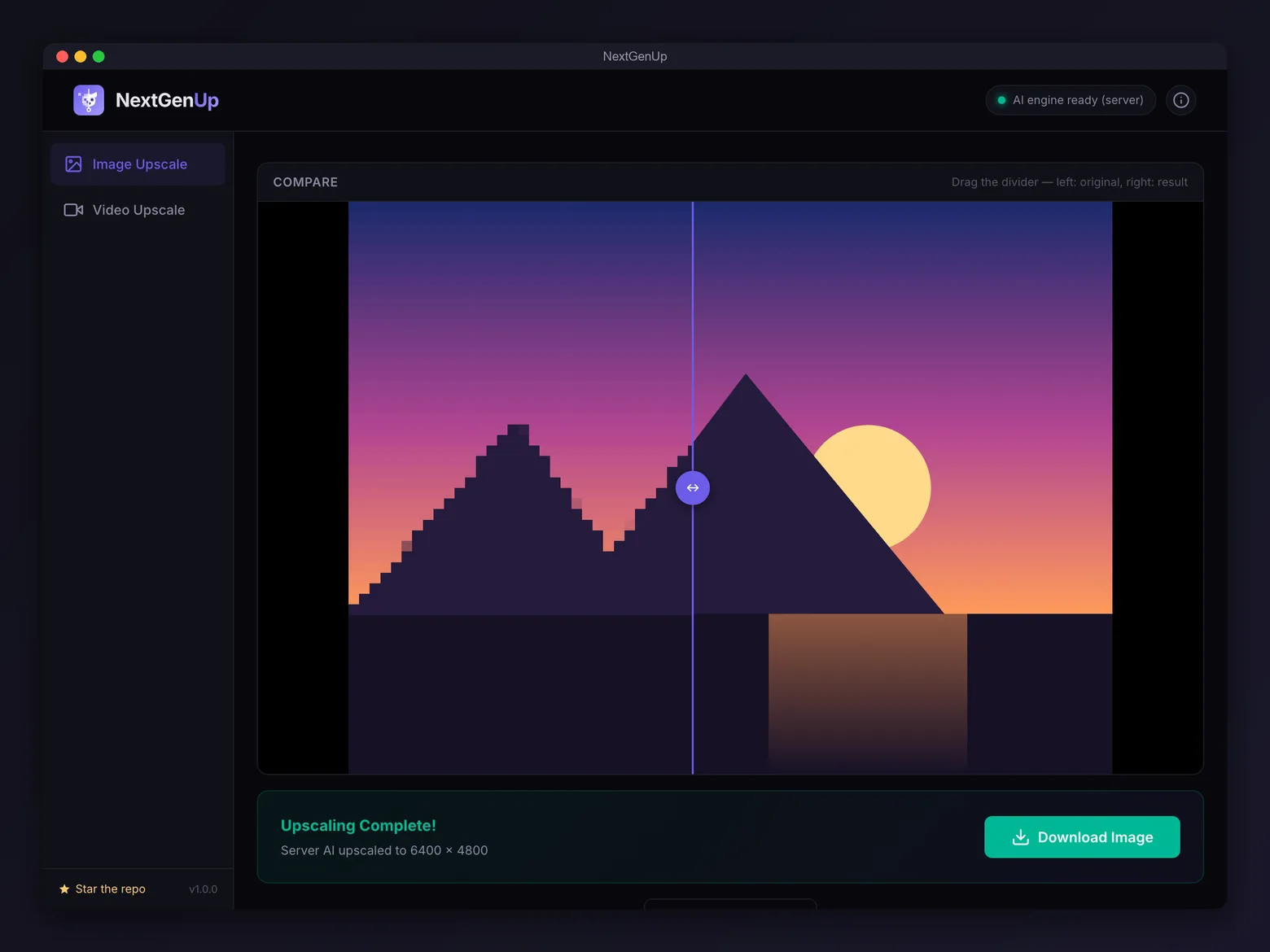
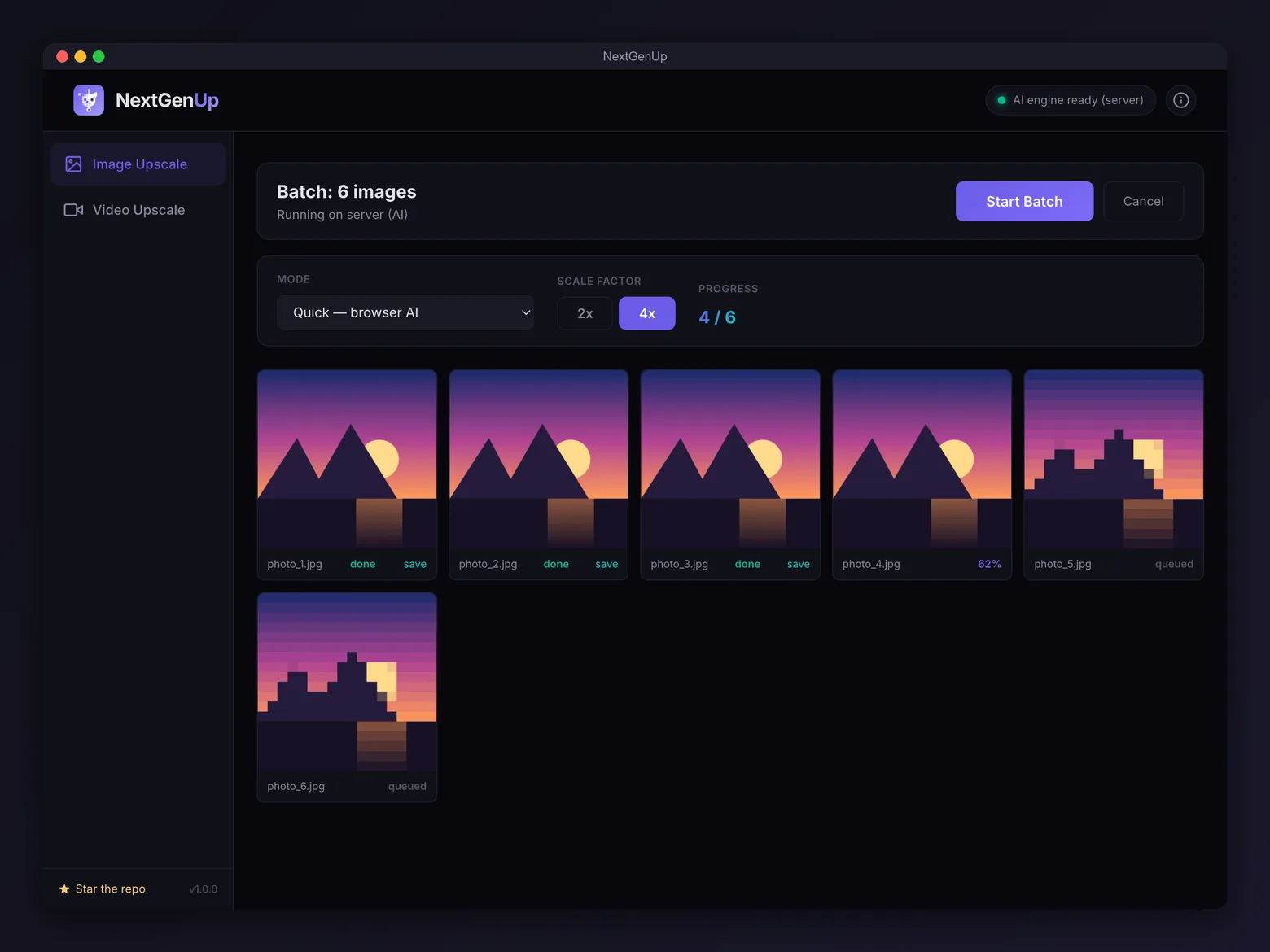
Everything factual here is verified from the source, not guessed: the license (MIT), the repository (github.com/riponcm/nextgenUp), the models (Real-ESRGAN realesr-general-x4v3, GFPGAN v1.4, YuNet), the four image modes, the platform builds, and the v1.0.0 release of 19 August 2026 all come from the repository and its release assets. The star count on this page is pulled live through OSSDrop, so it is current — and it is small, because the project is new. Screenshots are the project's own, unretouched.
We publish no benchmark numbers, PSNR/SSIM figures, or quality rankings. Upscaling output depends entirely on your source material, the mode you pick, and your hardware; the only benchmark that means anything is your own files. Where we compare against Topaz, Upscayl, or Video2X, we compare documented capabilities, not measured output. NextGenUp is listed on OSSDrop under the same rules as every other tool and gets no ranking preference.

NextGenUp
Best for upscaling photos and video locally, in one app, without a subscription
MIT · 73 stars · Creator / Media
NextGenUp wraps Real-ESRGAN and GFPGAN in a desktop app that stays out of the way. What makes it worth a look is not that it upscales — plenty of things do — but that it covers four genuinely different jobs behind one window, and that the most interesting of them is not upscaling at all.
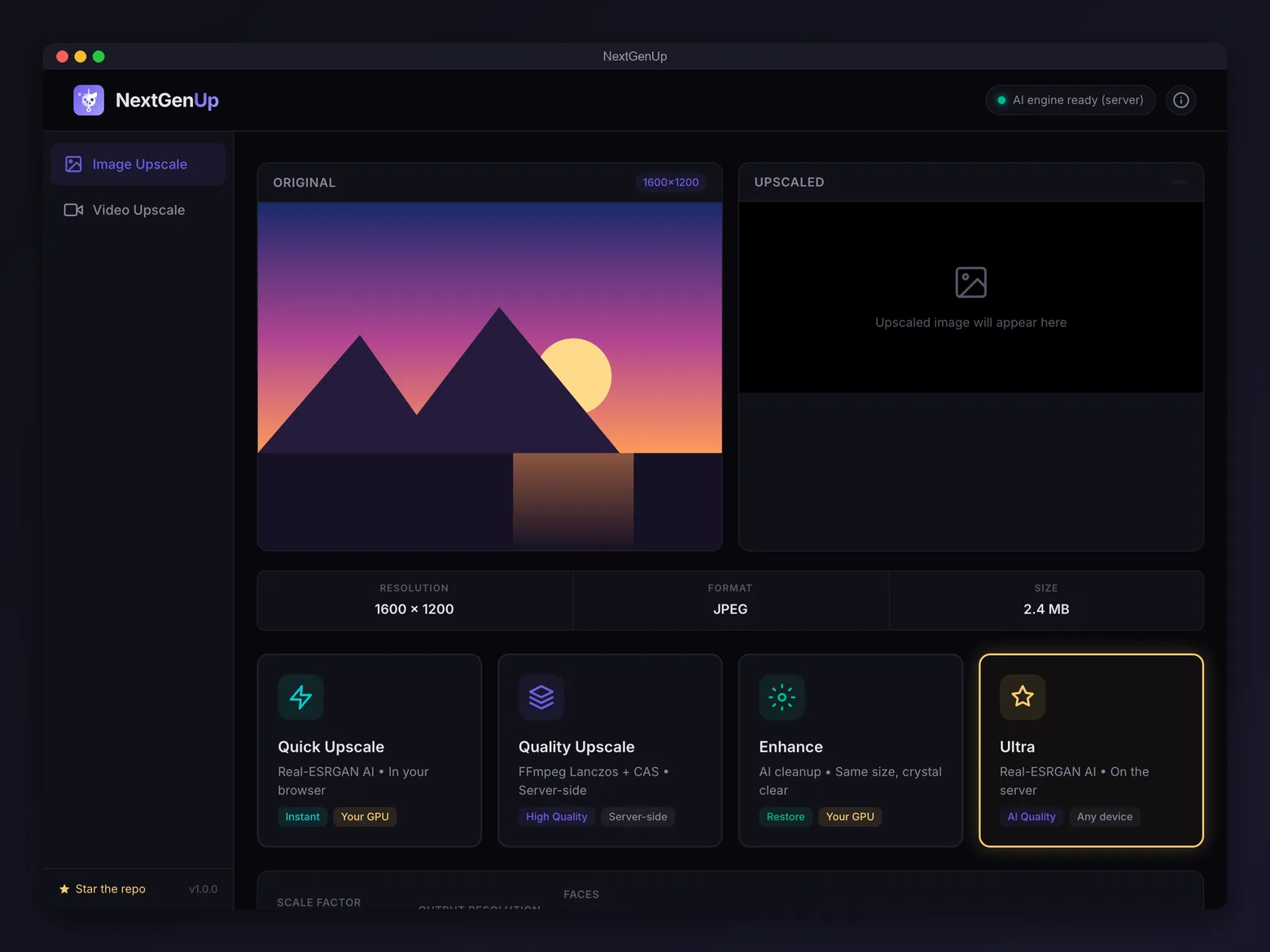
Images get four modes. Quick runs the AI model in the browser/app window via WebGPU, falling back to WASM where WebGPU is unavailable. Quality skips AI entirely for FFmpeg Lanczos with contrast-adaptive sharpening — not as clever, but very fast and often the right answer for clean source material. Ultra runs the model server-side for the highest-quality result, and is the path phones and browsers without WebGPU use. Enhance is the one to actually pay attention to: it upscales 4x internally to reconstruct detail, then downscales back to the original dimensions. Your 500x500 image stays 500x500, but noise, blur, and JPEG artifacts are gone. That is a common real need — "make this sharper, don't make it bigger" — that most upscalers simply cannot express.
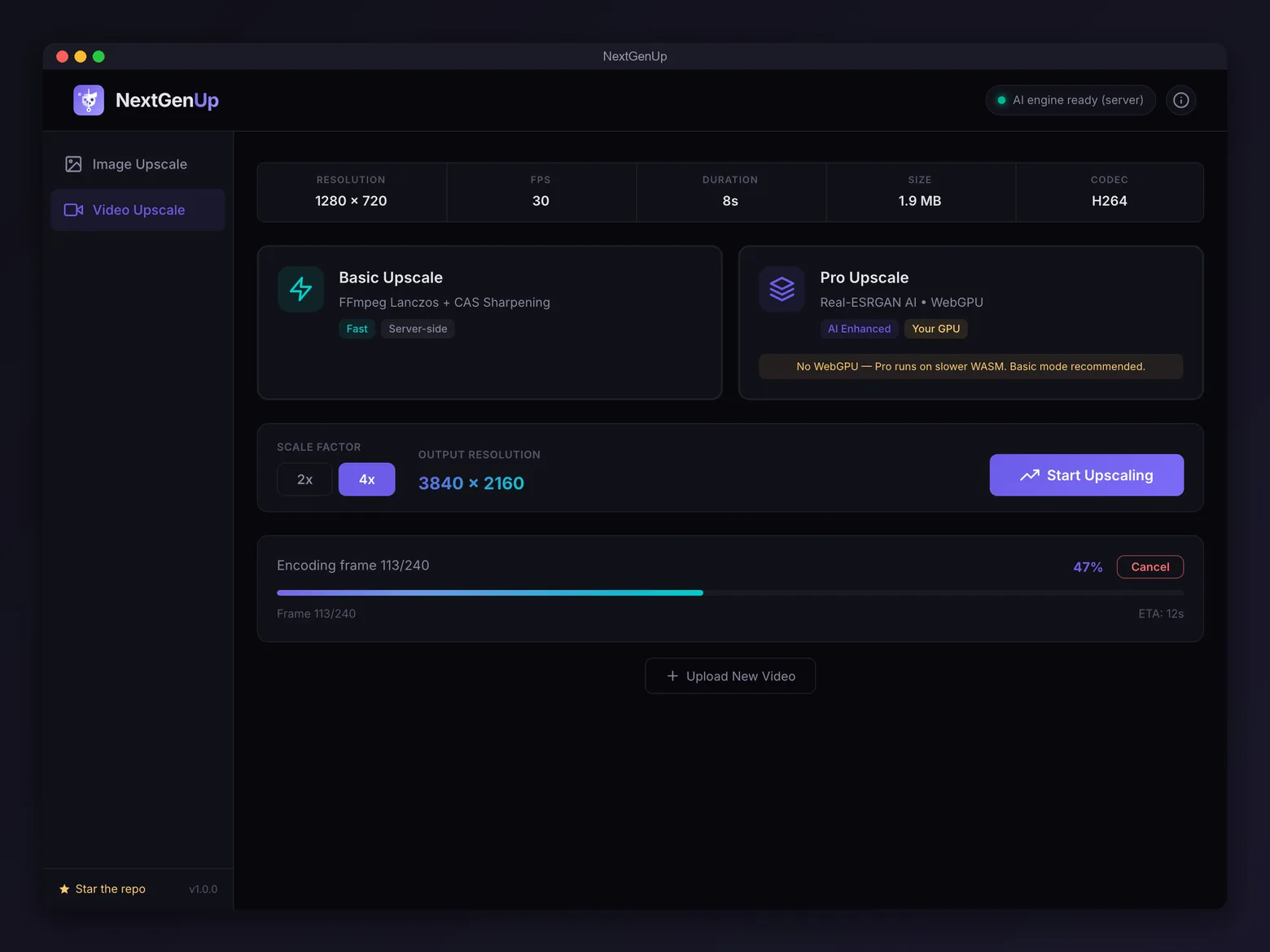
Video gets Basic (FFmpeg Lanczos plus sharpening) and Pro (Real-ESRGAN applied frame by frame). Audio is preserved, portrait footage is handled automatically, and output caps at 4K. Faces are a separate pipeline: YuNet detects them, GFPGAN v1.4 restores them, and each face is aligned and blended back into the frame — which is what makes the tool genuinely useful on old scans and heavily compressed portraits, as opposed to just making them bigger and blurrier.
The engineering details that matter day to day: images process in overlapping tiles, so resolution is not bounded by your RAM; inference runs in a Web Worker or a background thread, so the interface never locks up; every job is cancellable mid-run; completed tasks persist in SQLite and files self-delete after 24 hours. The desktop app updates itself from cryptographically signed GitHub releases. And no GPU is required — a GPU is faster, nothing more.
The bottom line
Local, open-source upscaling has closed most of the gap with paid tools for everyday work. What remains is fine detail at extreme magnification and years of polish — not the core model. NextGenUp's contribution is coverage: images, video, and faces in one offline app under MIT, plus an Enhance mode that solves a problem most upscalers cannot even express.
It is our own project, so the fairest advice we can give is to stop reading and test it. Run it against Upscayl, Video2X, or whatever you use now, on your files, and use the before/after slider rather than taking anyone's word for it. See the listing on OSSDrop, browse more Creator / Media tools, or drop your own open-source tool.
Which mode should you actually use
Mode choice matters more than any setting, and the naming does not make it obvious. In practice:
- Photo that is small and needs to be bigger — Quick for speed, Ultra when the result matters. Both run Real-ESRGAN; Ultra runs it server-side at higher quality.
- Photo that is the right size but looks rough — Enhance. This is the mode people miss. It cleans noise, blur, and compression artifacts while keeping the exact dimensions.
- Clean source, just needs to be larger — Quality. No AI, no hallucinated detail, very fast. On already-sharp images this often beats an AI pass, which can invent texture that was never there.
- Old scan or a compressed portrait — Ultra with Restore faces ticked. GFPGAN is doing the heavy lifting here, and the difference on faces is far more dramatic than the upscale itself.
- Phone or tablet — Ultra, because the browser modes need WebGPU. Point the device at the app's address on your network.
A useful habit with any upscaler: run two modes on the same file and use the before/after slider to compare. AI upscaling is not strictly better than classical scaling — it is different, and on clean source material Lanczos sometimes looks more faithful.
How the pipeline works
Understanding the pipeline explains the speed differences.
When you drop a file, Pillow and ffprobe read its metadata. Quality and Basic modes then hand off to FFmpeg for a Lanczos scale with contrast-adaptive sharpening and unsharp — fast, deterministic, no model involved. Quick, Enhance, and Pro run Real-ESRGAN through ONNX Runtime Web in a Web Worker, using WebGPU where available and WASM otherwise. Ultra runs the same model server-side on CPU, adds GFPGAN face restoration, and uses FFmpeg to reassemble video with its original audio.
Two implementation choices carry most of the practical weight. Images are processed in overlapping tiles, so an image far larger than available memory still completes — tiles are inferred separately and blended, which is why there is no hard resolution ceiling below the 8K output cap. And inference never runs on the UI thread, which is why progress stays smooth and cancellation is instant rather than leaving a wedged job behind.
The consequence worth internalising: Pro video is frame-by-frame model inference. A one-minute 30fps clip is 1,800 separate super-resolution passes. On CPU that is slow, and no amount of interface polish changes it. Use Basic for long footage and reserve Pro for short clips where quality justifies the wait.
Where it falls short
The honest limitations, in the order they are likely to affect you:
It is new. v1.0.0 landed on 19 August 2026. Commercial upscalers have years of edge cases beaten out of them and NextGenUp does not. If you are doing paid client work today, that maturity gap is a real argument for the paid tool, independent of output quality.
Topaz still wins at extreme zoom. Real-ESRGAN is a strong general model, but on fine detail at high magnification Topaz's models resolve more. For web images, social media, prints, and AI-generated media the gap is small enough not to matter. For large-format professional output, test both on your own files before switching.
Pro video is slow on CPU. See the pipeline section — this is inherent to frame-by-frame inference, not a bug.
Faces are images-only for now. Video frames do not get GFPGAN treatment yet; it is on the roadmap along with larger server models (Real-ESRGAN x4plus, HAT), WebCodecs frame extraction, in-app GFPGAN download, and a Docker image.
Hard output caps. 8K for images, 4K for video. Beyond that you need a different tool.
None of these are reasons not to try it — it is free and local, so the only cost is your time. They are reasons to test it against whatever you use now rather than switching on the strength of a review, particularly a review written by the people who built it.
Frequently asked questions
What is NextGenUp?
NextGenUp is a free, open-source desktop app that upscales images to 8K and video to 4K on your own computer. It uses Real-ESRGAN for super-resolution and GFPGAN v1.4 for face restoration, and is released under the MIT license at github.com/riponcm/nextgenUp.
Is NextGenUp free, and is there a catch?
It is free under the MIT license, with no trial period, watermark, subscription, or account requirement. The honest caveat is not price but maturity: it reached v1.0.0 in August 2026, so it has had far less real-world testing than commercial tools that have shipped for years.
Does NextGenUp upload my photos or videos anywhere?
No. The models, FFmpeg, and the local server all run on your own hardware, so your files never leave your machine. This is also why speed depends on your own CPU or GPU rather than a subscription tier.
Is it a good free alternative to Topaz Gigapixel AI or Topaz Video AI?
For web images, social media, prints, and AI-generated media, Real-ESRGAN results are generally comparable at zero cost. Topaz still tends to resolve fine detail better at extreme zoom and has a much longer track record. If you upscale professionally at large magnification, evaluate both on your own files before switching.
How does NextGenUp compare to Upscayl or Video2X?
Upscayl handles images only. Video2X handles video but takes more setup. NextGenUp covers images, video, and face restoration in one point-and-click app and can serve its interface to other devices on your network. Upscayl and Video2X are both mature, well-regarded projects, so pick based on whether you need one medium or several.
Which NextGenUp mode should I use?
Use Quick or Ultra to make an image bigger, Quality when the source is already clean and you only need more pixels, and Enhance when the image is the right size but looks rough. For old scans or compressed portraits, use Ultra with Restore faces enabled.